Citus Tutorial
In this guide we’ll create a Citus cluster with a coordinator node and three workers. Every node will have a secondary for failover. We’ll simulate failure in the coordinator and worker nodes and see how the system continues to function.
This tutorial uses docker compose in order to separate the architecture design from some of the implementation details. This allows reasoning at the architecture level within this tutorial, and better see which software component needs to be deployed and run on which node.
The setup provided in this tutorial is good for replaying at home in the lab. It is not intended to be production ready though. In particular, no attention have been spent on volume management. After all, this is a tutorial: the goal is to walk through the first steps of using pg_auto_failover to provide HA to a Citus formation.
Pre-requisites
When using docker compose we describe a list of services, each service may run on one or more nodes, and each service just runs a single isolated process in a container.
Within the context of a tutorial, or even a development environment, this matches very well to provisioning separate physical machines on-prem, or Virtual Machines either on-prem on in a Cloud service.
The docker image used in this tutorial is named pg_auto_failover:citus. It
can be built locally when using the attached Dockerfile found within the GitHub repository for pg_auto_failover.
To build the image, either use the provided Makefile and run make build,
or run the docker build command directly:
$ git clone https://github.com/hapostgres/pg_auto_failover
$ cd pg_auto_failover/docs/cluster

$ docker build -t pg_auto_failover:citus -f Dockerfile ../..
$ docker compose build
Our first Citus Cluster
Each node in the cluster is described by a pg_autoctl_node.ini file
bind-mounted into its container. There are three files:
[node]
kind = monitor
port = 5432

[postgresql]
pgdata = /tmp/pgaf

[options]
ssl  = self-signed
auth = trust
[node]
kind = coordinator
port = 5432

[postgresql]
pgdata = /tmp/pgaf

[monitor]
pguri = postgresql://autoctl_node@monitor/pg_auto_failover

[options]
ssl        = self-signed
auth       = trust
pg_hba_lan = true
[node]
kind = worker
port = 5432

[postgresql]
pgdata = /tmp/pgaf

[monitor]
pguri = postgresql://autoctl_node@monitor/pg_auto_failover

[options]
ssl        = self-signed
auth       = trust
pg_hba_lan = true
The worker.ini has no [formation] group entry. When that field is
absent the monitor assigns each worker to a group automatically — the first
worker to register in a group becomes primary, the second becomes secondary.
This is the right setup for the scaled deploy below, where we ask Docker
Compose to start six worker containers and let the monitor pair them.
The docker compose definition for the scalable cluster is:
 1services:
 2
 3  monitor:
 4    image: pg_auto_failover:citus
 5    volumes:
 6      - /tmp/pgaf
 7      - ./ini/monitor.ini:/etc/pgaf/node.ini:ro
 8    expose:
 9      - 5432
10    command: pg_autoctl node run
11
12  coord:
13    image: pg_auto_failover:citus
14    volumes:
15      - /tmp/pgaf
16      - ./ini/coordinator.ini:/etc/pgaf/node.ini:ro
17    environment:
18      PGUSER: citus
19      PGDATABASE: citus
20    expose:
21      - 5432
22    command: pg_autoctl node run
23
24  worker:
25    image: pg_auto_failover:citus
26    volumes:
27      - /tmp/pgaf
28      - ./ini/worker.ini:/etc/pgaf/node.ini:ro
29    environment:
30      PGUSER: citus
31      PGDATABASE: citus
32    expose:
33      - 5432
34    command: pg_autoctl node run
Every service runs pg_autoctl node run — creating the node on first
start, resuming on subsequent starts. All PG_AUTOCTL_* environment
variables are gone; everything lives in the ini files.
To run the full Citus cluster with HA from this definition:
$ docker compose up --scale coord=2 --scale worker=6
The --scale options tell Docker Compose how many containers to start for
each service:
one monitor node (default scale is 1),
two coordinator containers — one primary, one secondary,
six worker containers — the monitor pairs them into three groups of two, assigning a primary and secondary in each group.
Within a given group the first node that registers becomes primary; the monitor handles the assignment so we don’t have to track it. In a High Availability setup every node must be ready for promotion at any time, so the initial primary assignment within a group is not significant.
While the cluster is being provisionned by docker compose, you can run the
following command and have a dynamic dashboard to follow what’s happening.
The following command is like top for pg_auto_failover:
$ docker compose exec monitor pg_autoctl watch
Because the pg_basebackup operation that is used to create the secondary
nodes takes some time when using Citus, because of the first CHECKPOINT
which is quite slow. So at first when inquiring about the cluster state you
might see the following output:
$ docker compose exec monitor pg_autoctl show state
    Name |  Node |         Host:Port |       TLI: LSN |   Connection |      Reported State |      Assigned State
---------+-------+-------------------+----------------+--------------+---------------------+--------------------
 coord0a |   0/1 | cd52db444544:5432 |   1: 0/200C4A0 |   read-write |        wait_primary |        wait_primary
 coord0b |   0/2 | 66a31034f2e4:5432 |         1: 0/0 |       none ! |        wait_standby |          catchingup
worker1a |   1/3 | dae7c062e2c1:5432 |   1: 0/2003B18 |   read-write |        wait_primary |        wait_primary
worker1b |   1/4 | 397e6069b09b:5432 |         1: 0/0 |       none ! |        wait_standby |          catchingup
worker2a |   2/5 | 5bf86f9ef784:5432 |   1: 0/2006AB0 |   read-write |        wait_primary |        wait_primary
worker2b |   2/6 | 23498b801a61:5432 |         1: 0/0 |       none ! |        wait_standby |          catchingup
worker3a |   3/7 | c23610380024:5432 |   1: 0/2003B18 |   read-write |        wait_primary |        wait_primary
worker3b |   3/8 | 2ea8aac8a04a:5432 |         1: 0/0 |       none ! |        wait_standby |          catchingup
After a while though (typically around a minute or less), you can run that same command again for stable result:
$ docker compose exec monitor pg_autoctl show state

    Name |  Node |         Host:Port |       TLI: LSN |   Connection |      Reported State |      Assigned State
---------+-------+-------------------+----------------+--------------+---------------------+--------------------
 coord0a |   0/1 | cd52db444544:5432 |   1: 0/3127AD0 |   read-write |             primary |             primary
 coord0b |   0/2 | 66a31034f2e4:5432 |   1: 0/3127AD0 |    read-only |           secondary |           secondary
worker1a |   1/3 | dae7c062e2c1:5432 |   1: 0/311B610 |   read-write |             primary |             primary
worker1b |   1/4 | 397e6069b09b:5432 |   1: 0/311B610 |    read-only |           secondary |           secondary
worker2a |   2/5 | 5bf86f9ef784:5432 |   1: 0/311B610 |   read-write |             primary |             primary
worker2b |   2/6 | 23498b801a61:5432 |   1: 0/311B610 |    read-only |           secondary |           secondary
worker3a |   3/7 | c23610380024:5432 |   1: 0/311B648 |   read-write |             primary |             primary
worker3b |   3/8 | 2ea8aac8a04a:5432 |   1: 0/311B648 |    read-only |           secondary |           secondary
You can see from the above that the coordinator node has a primary and secondary instance for high availability. When connecting to the coordinator, clients should try connecting to whichever instance is running and supports reads and writes.
We can review the available Postgres URIs with the pg_autoctl show uri command:
$ docker compose exec monitor pg_autoctl show uri
         Type |    Name | Connection String
 -------------+---------+-------------------------------
      monitor | monitor | postgres://autoctl_node@552dd89d5d63:5432/pg_auto_failover?sslmode=require
    formation | default | postgres://66a31034f2e4:5432,cd52db444544:5432/citus?target_session_attrs=read-write&sslmode=require
To check that Citus worker nodes have been registered to the coordinator, we can run a psql session right from the coordinator container:
$ docker compose exec coord psql -d citus -c 'select * from citus_get_active_worker_nodes();'
  node_name   | node_port
--------------+-----------
 dae7c062e2c1 |      5432
 5bf86f9ef784 |      5432
 c23610380024 |      5432
(3 rows)
We are now reaching the limits of using a simplified docker compose setup.
When using the --scale option, it is not possible to give a specific
hostname to each running node, and then we get a randomly generated string
instead or useful node names such as worker1a or worker3b.
Create a Citus Cluster, take two
In order to implement the following architecture, we need to introduce a more complex docker compose file than in the previous section.
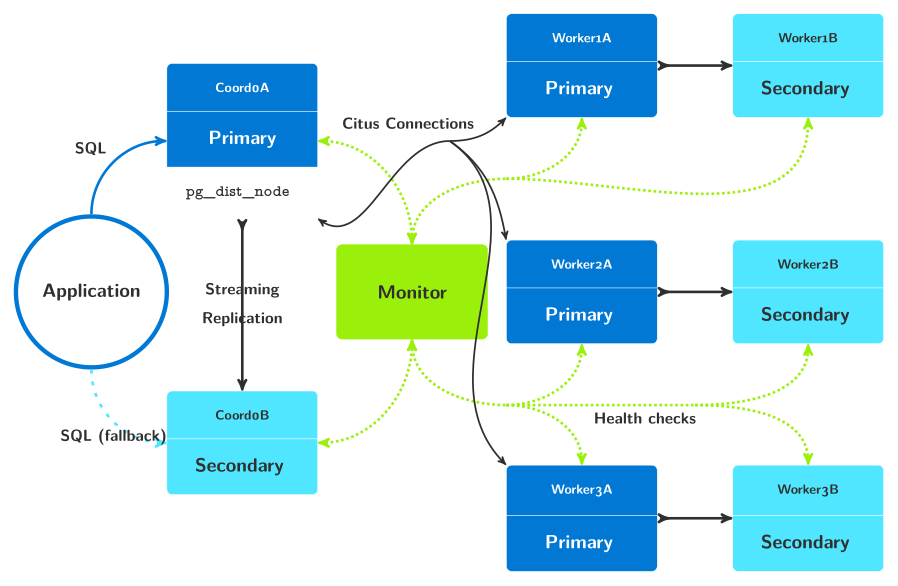
pg_auto_failover architecture with a Citus formation
This time we need per-group worker ini files so that each worker pair lands in the right Citus shard group:
[node]
kind = worker
port = 5432

[postgresql]
pgdata = /tmp/pgaf

[monitor]
pguri = postgresql://autoctl_node@monitor/pg_auto_failover

[formation]
group = 1

[options]
ssl        = self-signed
auth       = trust
pg_hba_lan = true
Worker 2 and worker 3 are identical except for group = 2 and
group = 3 respectively. When group is set, pg_autoctl node run
passes --group N to pg_autoctl create worker, pinning the pair to
that shard group.
The docker compose definition is:
 1x-coord: &coordinator
 2  image: pg_auto_failover:citus
 3  volumes:
 4    - /tmp/pgaf
 5    - ./ini/coordinator.ini:/etc/pgaf/node.ini:ro
 6  environment:
 7    PGUSER: citus
 8    PGDATABASE: citus
 9  expose:
10    - 5432
11  command: pg_autoctl node run
12
13services:
14  app:
15    build:
16      context: .
17      dockerfile: Dockerfile.app
18    environment:
19      PGUSER: citus
20      PGDATABASE: citus
21      PGHOST: coord0a,coord0b
22      PGPORT: 5432
23      PGAPPNAME: demo
24      PGSSLMODE: require
25      PGTARGETSESSIONATTRS: read-write
26
27  monitor:
28    image: pg_auto_failover:citus
29    volumes:
30      - /tmp/pgaf
31      - ./ini/monitor.ini:/etc/pgaf/node.ini:ro
32    expose:
33      - 5432
34    command: pg_autoctl node run
35
36  coord0a:
37    <<: *coordinator
38    hostname: coord0a
39
40  coord0b:
41    <<: *coordinator
42    hostname: coord0b
43
44  worker1a:
45    <<: &worker1
46      image: pg_auto_failover:citus
47      volumes:
48        - /tmp/pgaf
49        - ./ini/worker1.ini:/etc/pgaf/node.ini:ro
50      environment:
51        PGUSER: citus
52        PGDATABASE: citus
53      expose:
54        - 5432
55      command: pg_autoctl node run
56    hostname: worker1a
57
58  worker1b:
59    <<: *worker1
60    hostname: worker1b
61
62  worker2a:
63    <<: &worker2
64      image: pg_auto_failover:citus
65      volumes:
66        - /tmp/pgaf
67        - ./ini/worker2.ini:/etc/pgaf/node.ini:ro
68      environment:
69        PGUSER: citus
70        PGDATABASE: citus
71      expose:
72        - 5432
73      command: pg_autoctl node run
74    hostname: worker2a
75
76  worker2b:
77    <<: *worker2
78    hostname: worker2b
79
80  worker3a:
81    <<: &worker3
82      image: pg_auto_failover:citus
83      volumes:
84        - /tmp/pgaf
85        - ./ini/worker3.ini:/etc/pgaf/node.ini:ro
86      environment:
87        PGUSER: citus
88        PGDATABASE: citus
89      expose:
90        - 5432
91      command: pg_autoctl node run
92    hostname: worker3a
93
94  worker3b:
95    <<: *worker3
96    hostname: worker3b
We use YAML anchors and aliases to define templates for the coordinator
and each worker group, then apply them to the named services. Each service
sets its own hostname: — pg_autoctl node run uses the container
hostname as the node name when name is not set in the ini file.
Also this time we provision an application service (app) that sits in
the background and allows us to connect to the current primary coordinator.
See Dockerfile.app for its definition.
We start this cluster with:
$ docker compose up
And this time we get the following cluster as a result:
$ docker compose exec monitor pg_autoctl show state
    Name |  Node |     Host:Port |       TLI: LSN |   Connection |      Reported State |      Assigned State
---------+-------+---------------+----------------+--------------+---------------------+--------------------
 coord0a |   0/3 |  coord0a:5432 |   1: 0/312B040 |   read-write |             primary |             primary
 coord0b |   0/4 |  coord0b:5432 |   1: 0/312B040 |    read-only |           secondary |           secondary
worker1a |   1/1 | worker1a:5432 |   1: 0/311C550 |   read-write |             primary |             primary
worker1b |   1/2 | worker1b:5432 |   1: 0/311C550 |    read-only |           secondary |           secondary
worker2b |   2/7 | worker2b:5432 |   2: 0/5032698 |   read-write |             primary |             primary
worker2a |   2/8 | worker2a:5432 |   2: 0/5032698 |    read-only |           secondary |           secondary
worker3a |   3/5 | worker3a:5432 |   1: 0/311C870 |   read-write |             primary |             primary
worker3b |   3/6 | worker3b:5432 |   1: 0/311C870 |    read-only |           secondary |           secondary
And then we have the following application connection string to use:
$ docker compose exec monitor pg_autoctl show uri
        Type |    Name | Connection String
-------------+---------+-------------------------------
     monitor | monitor | postgres://autoctl_node@f0135b83edcd:5432/pg_auto_failover?sslmode=require
   formation | default | postgres://coord0b:5432,coord0a:5432/citus?target_session_attrs=read-write&sslmode=require
And finally, the nodes being registered as Citus worker nodes also make more sense:
$ docker compose exec coord0a psql -d citus -c 'select * from citus_get_active_worker_nodes()'
 node_name | node_port
-----------+-----------
 worker1a  |      5432
 worker3a  |      5432
 worker2b  |      5432
(3 rows)
Important
At this point, it is important to note that the Citus coordinator only
knows about the primary nodes in each group. The High Availability
mechanisms are all implemented in pg_auto_failover, which mostly uses the
Citus API citus_update_node during worker node failovers.
Our first Citus worker failover
We see that in the citus_get_active_worker_nodes() output we have
worker1a, worker2b, and worker3a. As mentioned before, that
should have no impact on the operations of the Citus cluster when nodes are
all dimensionned the same.
That said, some readers among you will prefer to have the A nodes as primaries to get started with. So let’s implement our first worker failover then. With pg_auto_failover, this is as easy as doing:
$ docker compose exec monitor pg_autoctl perform failover --group 2
15:40:03 9246 INFO  Waiting 60 secs for a notification with state "primary" in formation "default" and group 2
15:40:03 9246 INFO  Listening monitor notifications about state changes in formation "default" and group 2
15:40:03 9246 INFO  Following table displays times when notifications are received
    Time |     Name |  Node |     Host:Port |       Current State |      Assigned State
---------+----------+-------+---------------+---------------------+--------------------
22:58:42 | worker2b |   2/7 | worker2b:5432 |             primary |            draining
22:58:42 | worker2a |   2/8 | worker2a:5432 |           secondary |   prepare_promotion
22:58:42 | worker2a |   2/8 | worker2a:5432 |   prepare_promotion |   prepare_promotion
22:58:42 | worker2a |   2/8 | worker2a:5432 |   prepare_promotion |        wait_primary
22:58:42 | worker2b |   2/7 | worker2b:5432 |             primary |             demoted
22:58:42 | worker2b |   2/7 | worker2b:5432 |            draining |             demoted
22:58:42 | worker2b |   2/7 | worker2b:5432 |             demoted |             demoted
22:58:43 | worker2a |   2/8 | worker2a:5432 |        wait_primary |        wait_primary
22:58:44 | worker2b |   2/7 | worker2b:5432 |             demoted |          catchingup
22:58:46 | worker2b |   2/7 | worker2b:5432 |          catchingup |          catchingup
22:58:46 | worker2b |   2/7 | worker2b:5432 |          catchingup |           secondary
22:58:46 | worker2b |   2/7 | worker2b:5432 |           secondary |           secondary
22:58:46 | worker2a |   2/8 | worker2a:5432 |        wait_primary |             primary
22:58:46 | worker2a |   2/8 | worker2a:5432 |             primary |             primary
So it took around 5 seconds to do a full worker failover in worker group 2. Now we’ll do the same on the group 1 to fix the other situation, and review the resulting cluster state.
$ docker compose exec monitor pg_autoctl show state
    Name |  Node |     Host:Port |       TLI: LSN |   Connection |      Reported State |      Assigned State
---------+-------+---------------+----------------+--------------+---------------------+--------------------
 coord0a |   0/3 |  coord0a:5432 |   1: 0/312ADA8 |   read-write |             primary |             primary
 coord0b |   0/4 |  coord0b:5432 |   1: 0/312ADA8 |    read-only |           secondary |           secondary
worker1a |   1/1 | worker1a:5432 |   1: 0/311B610 |   read-write |             primary |             primary
worker1b |   1/2 | worker1b:5432 |   1: 0/311B610 |    read-only |           secondary |           secondary
worker2b |   2/7 | worker2b:5432 |   2: 0/50000D8 |    read-only |           secondary |           secondary
worker2a |   2/8 | worker2a:5432 |   2: 0/50000D8 |   read-write |             primary |             primary
worker3a |   3/5 | worker3a:5432 |   1: 0/311B648 |   read-write |             primary |             primary
worker3b |   3/6 | worker3b:5432 |   1: 0/311B648 |    read-only |           secondary |           secondary
Which seen from the Citus coordinator, looks like the following:
$ docker compose exec coord0a psql -d citus -c 'select * from citus_get_active_worker_nodes()'
 node_name | node_port
-----------+-----------
 worker1a  |      5432
 worker3a  |      5432
 worker2a  |      5432
(3 rows)
Distribute Data to Workers
Let’s create a database schema with a single distributed table.
$ docker compose exec app psql
-- in psql

CREATE TABLE companies
(
  id         bigserial PRIMARY KEY,
  name       text NOT NULL,
  image_url  text,
  created_at timestamp without time zone NOT NULL,
  updated_at timestamp without time zone NOT NULL
);

SELECT create_distributed_table('companies', 'id');
Next download and ingest some sample data, still from within our psql session:
\copy companies from program 'curl -o- https://examples.citusdata.com/mt_ref_arch/companies.csv' with csv
# ( COPY 75 )
Handle Worker Failure
Now we’ll intentionally crash a worker’s primary node and observe how the pg_auto_failover monitor unregisters that node in the coordinator and registers the secondary instead.
# the pg_auto_failover keeper process will be unable to resurrect
# the worker node if pg_control has been removed
$ docker compose exec worker1a rm /tmp/pgaf/global/pg_control

# shut it down
$ docker compose exec worker1a /usr/lib/postgresql/14/bin/pg_ctl stop -D /tmp/pgaf
The keeper will attempt to start worker 1a three times and then report the failure to the monitor, who promotes worker1b to replace worker1a. Citus worker worker1a is unregistered with the coordinator node, and worker1b is registered in its stead.
Asking the coordinator for active worker nodes now shows worker1b, worker2a, and worker3a:
$ docker compose exec app psql -c 'select * from master_get_active_worker_nodes();'

 node_name | node_port
-----------+-----------
 worker3a  |      5432
 worker2a  |      5432
 worker1b  |      5432
(3 rows)
Finally, verify that all rows of data are still present:
$ docker compose exec app psql -c 'select count(*) from companies;'
 count
-------
    75
Meanwhile, the keeper on worker 1a heals the node. It runs pg_basebackup
to fetch the current PGDATA from worker1a. This restores, among other
things, a new copy of the file we removed. After streaming replication
completes, worker1b becomes a full-fledged primary and worker1a its
secondary.
$ docker compose exec monitor pg_autoctl show state
    Name |  Node |     Host:Port |       TLI: LSN |   Connection |      Reported State |      Assigned State
---------+-------+---------------+----------------+--------------+---------------------+--------------------
 coord0a |   0/3 |  coord0a:5432 |   1: 0/3178B20 |   read-write |             primary |             primary
 coord0b |   0/4 |  coord0b:5432 |   1: 0/3178B20 |    read-only |           secondary |           secondary
worker1a |   1/1 | worker1a:5432 |   2: 0/504C400 |    read-only |           secondary |           secondary
worker1b |   1/2 | worker1b:5432 |   2: 0/504C400 |   read-write |             primary |             primary
worker2b |   2/7 | worker2b:5432 |   2: 0/50FF048 |    read-only |           secondary |           secondary
worker2a |   2/8 | worker2a:5432 |   2: 0/50FF048 |   read-write |             primary |             primary
worker3a |   3/5 | worker3a:5432 |   1: 0/31CD8C0 |   read-write |             primary |             primary
worker3b |   3/6 | worker3b:5432 |   1: 0/31CD8C0 |    read-only |           secondary |           secondary
Handle Coordinator Failure
Because our application connection string includes both coordinator hosts
with the option target_session_attrs=read-write, the database client
will connect to whichever of these servers supports both reads and writes.
However if we use the same trick with the pg_control file to crash our primary coordinator, we can watch how the monitor promotes the secondary.
$ docker compose exec coord0a rm /tmp/pgaf/global/pg_control
$ docker compose exec coord0a /usr/lib/postgresql/14/bin/pg_ctl stop -D /tmp/pgaf
After some time, coordinator A’s keeper heals it, and the cluster converges in this state:
$ docker compose exec monitor pg_autoctl show state
    Name |  Node |     Host:Port |       TLI: LSN |   Connection |      Reported State |      Assigned State
---------+-------+---------------+----------------+--------------+---------------------+--------------------
 coord0a |   0/3 |  coord0a:5432 |   2: 0/50000D8 |    read-only |           secondary |           secondary
 coord0b |   0/4 |  coord0b:5432 |   2: 0/50000D8 |   read-write |             primary |             primary
worker1a |   1/1 | worker1a:5432 |   2: 0/504C520 |    read-only |           secondary |           secondary
worker1b |   1/2 | worker1b:5432 |   2: 0/504C520 |   read-write |             primary |             primary
worker2b |   2/7 | worker2b:5432 |   2: 0/50FF130 |    read-only |           secondary |           secondary
worker2a |   2/8 | worker2a:5432 |   2: 0/50FF130 |   read-write |             primary |             primary
worker3a |   3/5 | worker3a:5432 |   1: 0/31CD8C0 |   read-write |             primary |             primary
worker3b |   3/6 | worker3b:5432 |   1: 0/31CD8C0 |    read-only |           secondary |           secondary
We can check that the data is still available through the new coordinator node too:
$ docker compose exec app psql -c 'select count(*) from companies;'
 count
-------
    75
Alternative: Citus cluster with pgaftest
The named Citus cluster from the previous section can also be started with a
single pgaftest command. pgaftest reads the .pgaf spec below,
generates the compose file, and opens a tmux session once all nodes are
healthy — no manual docker compose up or pg_autoctl watch needed.
# Citus cluster: one coordinator pair + three worker pairs
#
# Usage:
#   pgaftest setup docs/tutorial/citus_tutorial.pgaf --tmux

cluster {
    monitor

    formation coord {
        coord0a  coordinator
        coord0b  coordinator
    }

    formation workers num-sync 1 {
        worker1a  worker  group 1
        worker1b  worker  group 1
        worker2a  worker  group 2
        worker2b  worker  group 2
        worker3a  worker  group 3
        worker3b  worker  group 3
    }
}

setup {
    wait until primary, secondary  timeout 180s
}

teardown {
    compose down
}
Start it:
$ pgaftest setup docs/tutorial/citus_tutorial.pgaf --tmux
Three panes open immediately:
top —
docker compose logs -f(streaming container output)middle —
pg_autoctl watchshowing all eight nodes convergingbottom — interactive
bashin the coordinator primary
From the bottom pane, verify the cluster:
pg_autoctl show state \
    --monitor postgresql://autoctl_node@monitor/pg_auto_failover
To trigger a coordinator failover:
pg_autoctl perform failover --formation coord \
    --monitor postgresql://autoctl_node@monitor/pg_auto_failover
To trigger a worker failover in group 1:
pg_autoctl perform failover --group 1 \
    --monitor postgresql://autoctl_node@monitor/pg_auto_failover
When done:
$ pgaftest down --work-dir /tmp/pgaftest/citus_tutorial
For the full pgaftest reference see pgaftest.
Cleanup
To dispose of the entire tutorial environment, just use the following command:
$ docker compose down
Next steps
As mentioned in the first section of this tutorial, the way we use docker compose here is not meant to be production ready. It’s useful to understand and play with a distributed system such as Citus though, and makes it simple to introduce faults and see how the pg_auto_failover High Availability reacts to those faults.
One obvious missing element to better test the system is the lack of persistent volumes in our docker compose based test rig. It is possible to create external volumes and use them for each node in the docker compose definition, allowing nodes to restart over the same data set.
For production Kubernetes deployments, the same ini files work as
ConfigMaps: bind-mount them alongside a persistent volume claim for
/tmp/pgaf and use pg_autoctl node run as the container command.
See pg_autoctl node for the full property reference and
Container and Kubernetes Deployments for production patterns.
Now is a good time to go read Citus Documentation too, so that you know how to use this cluster you just created!